Are you fed up with constant iTunes errors? If you download apps or software from bad sources, your device may become unresponsive, but a quick restore through iTunes usually does the trick. Unless you are unlucky enough to be faced with an iTunes error 3194.
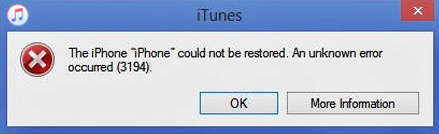
Annoying isn’t it? This error happens when iTunes and the Apple servers cannot connect to one another but you’ll be pleased to learn, that fixing it really isn’t all that difficult.
How to Fix iTunes Error 3194:
First, not all of these solutions are going o work for all users, so work through them in order until you get to the one that does work.
- Check Your Wi-Fi Connection

Sometimes, the error arises when the connection drops or isn’t properly connected. Try opening other apps or websites that require a connection and see if they work. Disable any VPN software on your device too, as these can block iTunes
If that didn’t fix it, move on.
- Disable Firewall and Anti-Virus
Both of these can interfere with the connection between iTunes and the Apple servers – the firewall is the worst one, even though iTunes is perfectly safe. Disable your firewall temporarily using Control Panel on your computer, but make sure you enable it again once you are done restoring your iPhone or iPad.
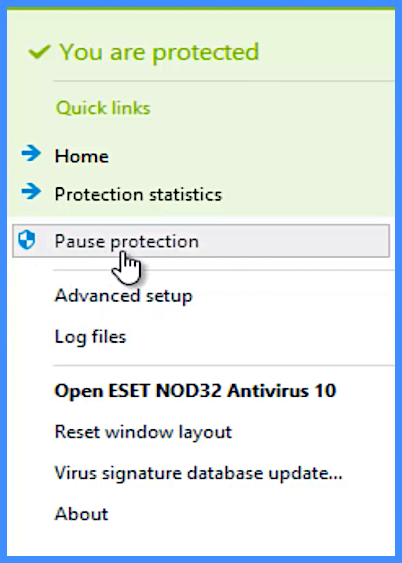
Your anti-virus software can also get in the way and needs to be disabled until you are done. You may be able to pause it but if not, shut it down so it isn’t working. Again, enable it again after.
We’re not done yet, If that didn’t work, try the next fix.
- Edit Hosts File

Do NOT do this unless you are comfortable with editing these files.
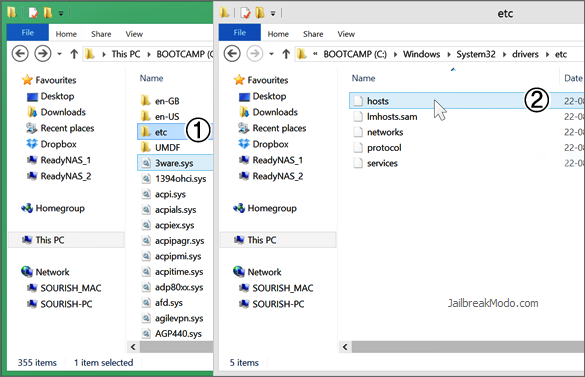
- Find your hosts file. On Mac, go to /etc/hosts and, on Windows, go to C:\Windows\system32\drivers\etc\hosts

- Now use a text editor on your computer (not MS Word) to open the hosts file
- Once open, go to the bottom line and type 208.10.249 gs.apple.com underneath it – this must be the final line in the hosts file
- Close it and reboot
- Try using iTunes to restore, and you should be able to do so without trouble.
Using TinyUmbrella to Fix iTunes Error 3194:

If nothing else has worked. You can use TinyUmbrella, one of the most powerful tools ever released. Here’s how.
- Download TinyUmbrella for Mac or Windows PC
- Plug in your iOS device to your computer and close iTunes
- Launch TinyUmbrella and wait for your device to be detected
- Click on Start TSS Server in the open window

- Press Shift (Windows) or ALT (Mac) on the keyboard and then click on the firmware that you want to restore your device to (there’s a list in TinyUmbrella)
- Leave your device; when the restore is done, your device will reboot.
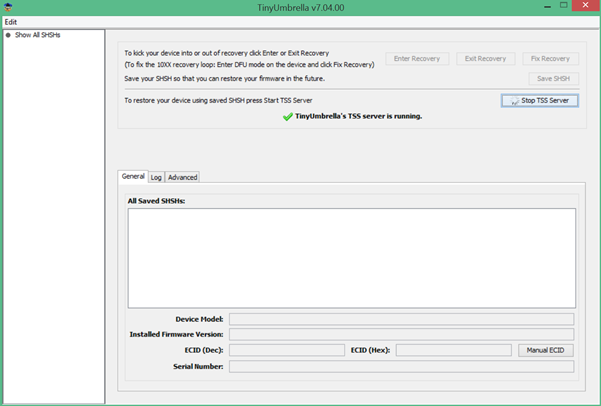
This will probably only work on older iOS devices. Right now, the updated version of TinyUmbrella is missing the Restore – Downgrade feature, although a new update is due any time to bring it back.
You can still use TinyUmbrella to save SHSH blobs though. Find out how it works by clicking the given link.
Has this solved the issue for you? Do let us know and follow us on Facebook for more updates.